Corporate Crowdsourcing

Saturday, November 22, 2014

Airtel 3g 1GB at Rs.127 for 28days trick

Enjoy Airtel 3g at just Rs.127 for 28days. Follow the below steps.

Goto airtel.in and select login


Login using your password or one time password received through sms.


Select 'Manage' under 'Manage Services'


Select 'All retail packs available in your circle' under 'view all 3g packs' and select the plan as shown below.


Select proceed then confirm with 'ok'. Make sure you have more than Rs.127 in balance as this is deductible and not a recharge.


Enjoy !!!

Saturday, February 20, 2010

WoWee Rovio WiFi Surveillance Robot

Wowee is unveiling its new WiFi enabled robotic webcam that can be controlled using any Internet enabled device. You can use a mobile phone, PC or even a video game console.Users can search around (or spy around) their home or office remotely through the Rovio’s built-in camera that streams video and audio transmitted via the robot. It features the NorthStar® smart navigation and positioning system, which makes the Rovio navigate accurately by itself and is able to avoid the obstacles on its way.

[Source]

Animated Business Cards (Video)

Until now business cards have been pretty boring, and generic, not seeing a whole lot of innovation. They may have a cool font or glossy paper, but thats usually the extent of it.

Chung Dha Lam has created a business card that will definitely captivate anyone you hand it to. Not only does it captivate, but in order to make the animation, you need to actually slide the inner card back and forth in its outer sleeve, thus making it the ultimate hands on experience, guaranteeing your card will awe its recipients.

[Source]

Make Your Automobile A Portable Kitchen

I don’t know many people that cook in their car, but if you are part of that group, check out this sandwich maker (Aka toaster) which be a good addition for your portable kitchen. The Road Pro 12 Volt Sandwich Maker, the device gets power from the cigarette lighter socket. The power cord only measures 5 foot, but since the cooking sessions are made inside the car, you probably don’t need much space…
[Link]

The Samsung Fashion Phone Tells Us When We’ve Eaten Too Much

Now I like a nicely styled, pretty phone as much as the next girl, but the plethora of ‘pink girly’ phones that companies produce in the hope they will lure girls into starry eyed submission is getting a little annoying. Now this offering is rather curious, as at first glance it does look nice, but moving beyond the clam-shell design, it’s packed with frankly insulting features, from a calorie counting system to a perfume matcher.

[Via]

Never Lose Count On How Many Beers You’ve Had Again

Sometimes it’s hard to keep track of a fun filled evening of beer drinking, especially when it comes to the exact number of how many you’ve had to drink.

Let there never be question again. The Beer Tracker never lies - each time a beer is cracked it is counted on the neat digital display.

Keep track as the night progresses, then, if you can find it in the morning, uncover the grand total of your exploits. Ideal for world record attempts. Happy drinking!

Monday, August 24, 2009

Sony Announces PS3 "Slim"

At a a press conference in Cologne, Germany at the GamesCom Expo on Tuesday, Sony confirmed a newer, slimmer PS3 is coming. It will release in the first week of September.

The exact dates of launch are September 1 in North America and Europe, September 3 for Japan). The slimmed-down PS3 will retail for $300, or 300 euros, or 29,980 Yen.

Sony says the device has the same features and functions as the "old" PS3 but is 33% smaller, 36% lighter, and ships with a 120GB hard drive. In anticipation of the new release and in hopes of finding anxious "suckers," er, buyers, existing PS3 SKUs will seen their prices dropped $100 apiece tomorrow. Of course, why anyone would buy an old model with the new one coming out in a few weeks, and with a larger HD would be beyond me.

Full specs:

  • Product name: PlayStation 3
  • Product code: CECH-2000A (Charcoal Black)
  • CPU: Cell Broadband Engine™
  • GPU: RSX
  • Audio output: LPCM 7.1ch, Dolby Digital, Dolby Digital Plus, Dolby TrueHD, DTS, DTS-HD, AAC.
  • Memory: 256MB XDR Main RAM, 256MB GDDR3 VRAM
  • Hard disk: 120GB 2.5" Serial ATA
  • USB 2.0 ports: 2
  • Networking: Ethernet (10BASE-T, 100BASE-TX, 1000BASE-T), IEEE 802.11 b/g, Bluetooth 2.0 (+EDR)
  • Controller: Wireless Controller (Bluetooth) x 1
  • AV outputs: HDMI x 1, AV MULTI OUT x 1, Digital out (optical) x 1
  • Resolutions: 1080p, 1080i, 720p, 480p, 480i (for PAL 576p, 576i)
  • BD / DVD / CD drive (read only): BD × 2 (BD-ROM), DVD × 8 (DVD-ROM), CD × 24 (CD-ROM)
  • Power: AC 220 – 240, 50/60Hz
  • Power consumption: Approx. 250W
  • External dimensions (excluding maximum projecting part): Approx. 290 × 65 × 290 mm (width × height × length)
  • Mass: Approx. 3.2kg
  • Included in box: PlayStation 3 system × 1, Wireless Controller (DUALSHOCK 3) × 1, AC power cord × 1, AV cable × 1, USB cable × 1
President and CEO of Sony Computer Entertainment of America (SCEA) talks up the new slim PS3 below.

The Average Gamer is Fat, and Depressed. Oh, and Older Than We Thought.

A new study by the federal Centers for Disease Control and Prevention, Emory University and Andrews University concludes that the average age of video-gamers in the U.S. is in the range 35–54. It also says that those gamers are fat, and miserable, though differences exist across genders.

With regards to the weighty "fat" conclusion, it's unclear if those surveyed had Nintendo Wiis with "exergaming" titles or not.

The study, "Health-Risk Correlates of Video-Game Playing Among Adults," published in the October issue of the American Journal of Preventive Medicine, analyzed data from 552 adults in the Seattle-Tacoma area. The subjects ranged in age from 19 to 90. About 45% of respondents said they played video games often.

Female video-game players reported greater depression and lower health status than female nonplayers. Male video-game players reported higher BMI and more Internet use time than male nonplayers. Both female and male video-game players show greater reliance on the Internet for social support.

The study was conducted in 2006, but results were not analyzed until 2008. The theory had already been posited that video gamers wouldn't be as healthy as non-gamers, and that's what seems to have been the result of the study. Dr. James B Weaver III, PhD, MPH, National Center for Health Marketing, CDC, Atlanta, writes in the article:

"As hypothesized, health-risk factors – specifically, a higher BMI and a greater number of poor mental-health days – differentiated adult video-game players from nonplayers. Video-game players also reported lower extraversion, consistent with research on adolescents that linked video-game playing to a sedentary lifestyle and overweight status, and to mental-health concerns. Internet community support and time spent online distinguished adult video-game players from nonplayers, a finding consistent with prior research pointing to the willingness of adult video-game enthusiasts to sacrifice real-world social activities to play video games."
To translate the above: video gamers are fat, depressed, introverts, and prefer to play video games as opposed to real-life interaction with people. A sad combination, to be sure.

However, as I said earlier, the health-related consequences of video gaming are different depending on gender. Since the study noted that women gamers are more depressed than non-gamers, the study suggests that women gamers may be self-medicating, essentially "forgetting their troubles" during the game.

On the other hand, men suffer more from issues with higher body-mass indices or BMI (translation: they're fat) and isolation issues, and thus prefer to play video games with a social aspect (MMORPGs?). This, according to researchers, also and tends to demonstrate that the association among sedentary behaviors, physical inactivity, and overweight status observed in children and young adults may extend into adulthood.

Since the health-related effects of video-gaming on people differs depending on gender, the researchers suggested that interventions be differentiate by sex. Naturally, they also stated that more research needs to be done.

Why the Seattle-Tacoma area? According to the researchers, both because of its size as the 13th largest media market in the United States and because its Internet usage level is "the highest in the nation."

Teens and Cell Phones Inseparable: Survey

Kids and cell phones. You can't live with 'em, and you can't live without 'em. I'm speaking of the kids, actually, as cell phones, most teens would say they can't live without, period.

A new Pew Internet & Life Project survey (.PDF) shows that, unsurprisingly, cell phone use is continuing to rise among teens.

Specifically, the first Pew survey in 2004 showed that 45% of teens (vs. 65% of adults) had a cell phone. As of 2008, that number had risen to 71% (vs. 77% of adults). The survey had 914 respondents in 2004, vs. 2,134 respondents in 2008. Data was collected from those 12 - 17 years of age.

Age tends to affect both ownership and activity. Only 52 percent of 12- to 13-year-olds own a cell phone. At age 14 the percentage leaps to 72%, while more than 17-year-olds owned their own cell phone.

In terms of activity, only 28% of 12-year-olds talked with their friends daily via cell phone, while more than 70% of 17-year-olds did so. Text messaging showed a similar gap, with That also holds true for texting, as 25% of those aged 12 - 14 text daily, while 51% of teens aged 15 - 17 do so.

It should come as no surprise that the most popular activity for teens is ... text-messaging. Among all teens, 38% of all teens do this on a daily basis, while 26% send messages daily via social networking sites (e.g. Facebook, MySpace) and 24% use instant messaging. Sadly, a mere 29% spend time with their friends face-to-face, something that psychologists, and even the Pope, have warned about.

Texting is more popular among girls, probably also unsurprisingly, with 42% sending text messages to friends daily, while about 34% of boys do the same.

By age 17, about 82 percent of the survey's respondents owned one. But the cell phone isn't the most frequently- used communications device; that's still the landline, Pew found, with 88 percent using it versus 66 percent for cell phones.

Also noted by Pew, the more money, the more likely teens would have a cell phone.

  • Households earning $30,000 or less: 62%
  • Households earning $30 - 50,000: 63%
  • Households earning $50 - 75,000: 72%
  • Households earning more than $75,000: 79%
In terms of what teens desire most, or at least, have the most, is something you might think of, as well, as popular electronica amongst teens: a game console (78%). Next was an MP3 player (74%). The cell phone was a close third.

Wikipedia Launches Official iPhone App

The Wikimedia Foundation, the organization behind the online encyclopia-like wiki Wikipedia, has launched its own iPhone application. While there were third-party iPhone Wikipedia applications, this is the first official release from the Foundation.

Wikipedia Mobile is free, just as the site is, in the App Store. Here's how the app is described:

Wikipedia is now officially on the iPhone! This is our official application and we are working hard on making the absolute best Wikipedia app out there.

This app is focused on being very simple and very fast. Over time, we'll add features based on requests.

The code is 100% open source and community built. If you are a programmer and good at JS/HTML5, then come and help us out!
Yes, yes, they're trolling for developers, too. One thing, though: they're not kidding when they say they will add features. For now, the application is little more than a wrapper around the mobile version of the Wikipedia site. One advantage, admittedly, is that you can save your search history.

Let's bring on those feature requests!

Apple, AT&T, Google Respond to FCC Over Google Voice Rejection

Early this month, the FCC sent requests to AT&T, Google, and Apple, asking them a series of questions about the way applications are accepted or rejected from the App Store. This all began with the rejection of Google Voice, BTW. The deadline was August 21st. Naturally, all 3 companies waited until the last minute, but they did respond on Friday.

You can expect that all three responses would be full of legalize, and you'd be right. Here's a summary of what they said, however.

AT&T: We did nothing wrong. We have no control over the App Store. We weren't asked about Google Voice.

“To that end, let me state unequivocally, AT&T had no role in any decision by Apple to not accept the Google Voice application for inclusion in the Apple App Store. AT&T was not asked about the matter by Apple at any time, nor did we offer any view one way or the other."
Here's the full response they sent to the FCC:
ATT Response to FCC iPhone Letter 082109 as Filed


Apple: We did nothing wrong. The App Store is wonderful. Google tried to muck with our wonderful UI. And we haven't rejected it!
Contrary to published reports, Apple has not rejected the Google Voice application, and continues to study it. The application has not been approved because, as submitted for review, it appears to alter the iPhone’s distinctive user experience by replacing the iPhone’s core mobile telephone functionality and Apple user interface with its own user interface for telephone calls, text messaging and voicemail. Apple spent a lot of time and effort developing this distinct and innovative way to seamlessly deliver core functionality of the iPhone.
View their response to the FCC below:
Apple Response to FCC


Google: We (obviously) did nothing wrong (except that we redacted the good parts of the letter). Oh, and our web app version of Google Voice is going to be really lame compared to a real app.

View Google's full response:
Google Response to FCC


I'm hoping this isn't done. Many would obviously love to see Google Voice in the App Store. Personally, if it's not there when iPhone OS 3.1 is jailbroken, I might just consider jailbreaking my iPhone.

App Store User Review Gaming Uncovered

It's not the first example of end user review gaming, (anyone recall the Belkin Amazon.com review "scandal" from January?) and there's no reason to believe there isn't a lot more of this going on than you might think. In fact, a leaked document shows end user review gaming is happening in the App Store.

Reverb Communications is a PR firm that specializes in video games on several platforms. Their site describes the advantages of Reverb thusly:

At Reverb Communications, we specialize in launching new videogame titles and videogame peripherals with our distinct integrated approach. From messaging and PR planning to sales calls with retailers, Reverb provides REAL SOLUTIONS that directly contribute to your bottom line.
Real solutions like paying for reviews, apparently. Here's what the document shared with Mobile Crunch says:
Reverb employs a small team of interns who are focused on managing online message boards, writing influential game reviews, and keeping a gauge on the online communities. Reverb uses the interns as a sounding board to understand the new mediums where consumers are learning about products, hearing about hot new games and listen to the thoughts of our targeted audience. Reverb will use these interns on (redacted) products to post game reviews (written by Reverb staff members) ensuring the majority of the reviews will have the key messaging and talking points developed by the Reverb PR/marketing team.
In other words, ensuring the majority of reviews will be positive.

Additionally, the company indicates it will tailor the reviews to appear from different age ranges, including keywords that "resonate" with the demographic. They start the reviews on the day of launch.

The cost: $0.75 per app download. Not just taking the word of the tipster, MC did some homework, found apps belonging to clients of Reverb Communications, and by cross-checking reviewers against other Reverb Communications' clients, found an astounding coincidence: some reviewers seemed to only give 5-star reviews, and only for Reverb clients, no one else.

As Ricky Ricardo would say: Reverb, you got some 'splainin' to do.

Install Any Windows 7 Version From One DVD

Let's be clear, this is a way to try, not indefinitely use different versions of Windows 7 from one DVD or .ISO image. A small tweak will allow users tech-savvy enough to get a taste of all the versions of Windows 7.

Now, why do you need a little technical expertise? You need to remove a file from the DVD or from the .ISO image. As Windows Secrets notes, all you have to do is delete the ei.cfg file.

This means that you can start with a Windows 7 Home Premium (or whatever) DVD and install any version you want, though of course you'd need a compatible activation code to keep that version. To make things easier for you, the ei.cfg file is in the sources subdirectory (WS didn't indicate its location).

It's simple enough: if you have an .ISO file use an appropriate .ISO imaging program to delete the file from it, then save the image and burn it. If you have the DVD you can use the same program to rip the DVD to an .ISO image, then delete the file, and reburn it.

Once deleted, you'll get a menu of choices, as shown above. You can select any version of Windows 7 to install, and thus try out any version, to see if you really, really want to buy that version.

Also, while the standard trial period is 30 days, just as with Windows Vista, you can extend that through the use of Microsoft's Software License Manager (slmgr), which ships with the OS.

If you install Windows 7 sans activation key, you have 30 days to try the software. Using slmgr, you can "rearm" and restart the clock. If you right-click on the Computer icon, and choose Properties, under Windows Activation, you'll see the number of days left in your trial period.

To restart the clock,

  • Click Start, All Programs, Accessories. Right-click Command Prompt and choose Run As Administrator. If necessary, enter your administrator password.
  • Type "slmgr -rearm" and press the Enter key.
  • Restart Windows 7.
You can rearm a total of three times. Wait until the end of each period and you get a total of 120 days of use. Want to try another version? You can do a clean install.

Which version are you readers going to install?

iPhone Outsold All Windows Mobile Phones in Q2: Analyst

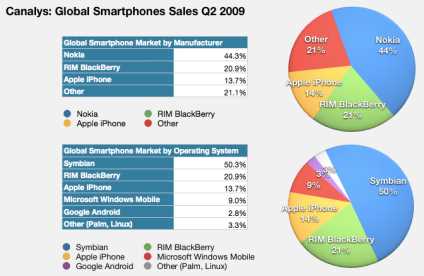
Technology industry analyst Canalys released a report on Q2 2009 earlier this week, that stated what we already knew from prior such analysis: that smartphone sales continue to be strong. Not just that, though: Windows Mobile continues to sink, with the iPhone outselling all Windows Mobile devices.

Nokia retained its lead with 44.3% of smartphone shipments, and RIM continues to be second with 20.9%. Meanwhile, the iPhone came in at third with 13.7%. When looking at different platforms, the top three were the exact same as above, with Symbian representing Nokia, but Windows Mobile came in at 9%, fourth place among platforms.

Also of note is that the touchscreen form factor that the iPhone made popular continues to be popular. 39.6% of all smartphones sold have touchscreens, compared to 12.3% being keypad-based devices like BlackBerry and just 10.7% being keyboard devices like those sold by HTC using Windows Mobile.

Despite the absence of Palm's webOS in the list of platforms above, Chris Jones, Canalys VP and principal analyst, had some good things to say about Palm:

“As a relatively small company, Palm has shown what creative leadership and focused investment can achieve. By going back to its roots and developing its own operating system, it has produced an innovative and differentiated product. Investors have responded to this, with its share price growing over 70% this year. Palm still has plenty of challenges ahead – it must find the resources to launch the Pre on the global stage, while continuing to fund development of its product pipeline. But it is remarkable how much better the prospects are for this company than just one year ago.”

Tuesday, August 5, 2008

How to Repair or Reinstall ur Windows XP


1. Boot the computer using the XP CD. You may need to change the
boot order in the system BIOS. Check your system documentation
for steps to access the BIOS and change the boot order.


2. When you see the "Welcome To Setup" screen, you will see the
options below This portion of the Setup program prepares Microsoft
Windows XP to run on your computer:

To setup Windows XP now, press ENTER.

To repair a Windows XP installation using Recovery Console, press R.

To quit Setup without installing Windows XP, press F3.


3. Press Enter to start the Windows Setup.

do not choose "To repair a Windows XP installation using the
Recovery Console, press R", (you do not want to load Recovery
Console). I repeat, do not choose "To repair a Windows XP
installation using the Recovery Console, press R".

4. Accept the License Agreement and Windows will search for existing
Windows installations.

5. Select the XP installation you want to repair from the list and
press R to start the repair. If Repair is not one of the options,
read this Warning!!

6. Setup will copy the necessary files to the hard drive and reboot.
Do not press any key to boot from CD when the message appears.
Setup will continue as if it were doing a clean install, but your
applications and settings will remain intact.

Blaster worm warning: Do not immediately activate over the internet
when asked, enable the XP firewall
[ http://support.microsoft.com/?kbid=283673 ]
before connecting to the internet. You can activate after the
firewall is enabled. Control Panel - Network Connections. Right click
the connection you use, Properties, and there is a check box on the
Advanced [ http://michaelstevenstech.com/xpfirewall1.jpg ] page.


7. Reapply updates or service packs applied since initial Windows XP
installation. Please note that a Repair Install from the Original
install XP CD will remove SP1/SP2 and service packs will need to be
reapplied.
Service Pack 2
http://www.microsoft.com/downloads/details.aspx?FamilyId=049C9DBE-3B8E-
4F30-8245-9E368D3CDB5A&displaylang=en
An option I highly recommend is creating a Slipstreamed XP CD with SP2.
Slipstreaming Windows XP with Service Pack 2 (SP2)
http://www.winsupersite.com/showcase/windowsxp_sp2_slipstream.asp

______________________________________________________________________

Warning!!
If the option to Repair Install is not available and you continue
with the install;you will delete your Windows folder and Documents
and Settings folder. All applications that place keys in the registry
will need to be re-installed. You should exit setup if the repair
option is not available and consider other options.

Try the link below if the repair option is not available.
Windows XP Crashed?
http://www.digitalwebcast.com/2002/03_mar/tutorials/cw_boot_toot.htm
Here's Help.
A salvage mission into the depths of Windows XP, explained by a
non-geek

by Charlie White
http://www.digitalwebcast.com/2002/03_mar/tutorials/cw_boot_toot.htm

Related links
You May Lose Data or Program Settings After Reinstalling, Repairing,
or Upgrading Windows XP (Q312369)
http://support.microsoft.com/default.aspx?scid=kb;en-us;Q312369

System Restore "Restore Points" Are Missing or Deleted (Q301224)
http://support.microsoft.com/default.aspx?scid=kb;en-us;Q301224

How to Perform an In-Place Upgrade (Reinstallation) of Windows XP
(Q315341)
http://support.microsoft.com/search/preview.aspx?scid=kb;en-us;Q315341

Warning!! If the Repair Option is not Available
What should I do? Most important do not ignore the information below!

If the option to Repair Install is NOT available and you continue
with the install; you will delete your Windows folder, Documents and
Settings folders. All Applications that place keys in the registry
will need to be re-installed.

You should exit setup if the repair option is not available and
consider other options. I have found if the Repair option is not
available, XP is usually not repairable and will require a Clean
install.http://michaelstevenstech.com/cleanxpinstall.html
If you still have the ability to access the Windows XP installation,
backup all important files not restorable from other sources before
attempting any recovery console trouble shooting attempts.

Possible Fix by reconfiguring boot.ini using Recovery Console.
1.Boot with XP CD or 6 floppy boot disk set.
2. Press R to load the Recovery Console.
3. Type bootcfg.
4. This should fix any boot.ini errors causing setup not to see the
XP OS install.
5. Try the repair install.

One more suggestion from MVP Alex Nichol

"Reboot, this time taking the immediate R option, and if the CD
letter is say K: give these commands

COPY K:\i386\ntldr C:\
COPY K:\i386\ntdetect.com C:\


(two other files needed - just in case)

1. Type: ATTRIB -H -R -S C:\boot.ini DEL C:\boot.ini

2. Type: BootCfg /Rebuild

which will get rid of any damaged boot.ini, search the disk for
systems and make a new one. This might even result in a damaged
windows reappearing; but gives another chance of getting at the
repair"

Unlock toolbars to work with them

A toolbar is a collection of buttons or icons—usually displayed across the top of the screen—that represents the different tasks you can do within a program. For example, in Microsoft Internet Explorer, there is a toolbar for the standard Internet Explorer command buttons, one for entering an Internet address, and one for quick links you can set up.

When you open a toolbar, it will appear in a particular spot on the screen. If you want to change the location of the toolbar you can move it by dragging it to the new location. You can also resize the toolbar by dragging its edge. If you find a toolbar that cannot be moved or resized, the toolbar may be locked.

To unlock a toolbar

1.Make sure you have only one window open for the program. (You can look at the taskbar at the bottom of your screen to verify this.) Then, right-click the toolbar.

2.If Lock the Toolbars appears on the shortcut menu and is selected (a check mark appears to the left of it), click Lock the Toolbars to unlock the toolbar. If you see Lock the Toolbars, but no check mark appears to the left of it, the toolbar is already unlocked.

Note: If Lock the Toolbars does not appear on the shortcut menu, you may not be able to move or resize the toolbar.

If you are able move the toolbar, once you’ve moved the toolbar to the location where you want it, select Lock the Toolbars so that it isn’t inadvertently moved. To make sure the change is permanent, lock the toolbar, exit the program, and then reopen it. The toolbar should be locked.

Toolbar shortcut menu with Lock the Toolbars selected

AUTO DELETE TEMPORARY FOLDER.!!

what i prefer is %temp% " without quotes.. at Start -> Run..
this opens ur temp folder n den u cal erase it neatly// still try dis one too..


First go into gpedit.msc
Next select -> Computer Configuration/Administrative Templates/Windows Components/Terminal Services/Temporary Folder
Then right click "Do Not Delete Temp Folder Upon Exit"
Go to properties and hit disable. Now next time Windows puts a temp file in that folder it will automatically delete it when its done! Note from Forum Admin: Remember, GPEDIT (Group Policy Editor) is only available in XP Pro.

Prevent Pen Drive Virus

Prevent PenDrive Virus
:: Do the following ::

1) Disable autorun/autoplay function of your pen drive.

2) Now plugin your pen drive and open any folder of your computer.
(Do not open any folder from ur pen drive.)

3) Now goto tools then select Folder Option
In that box mark the Show Hidden Files & Folders option.
Also Uncheck Hide Extension for known file types & Hide Protected OS files.

Now click apply and ok buttons and close that folder.

4) Nome come to desktop.
On the Desktop, click on windows Start button and select Search for files & folders.

When the search dialog box appears on the screen, in that click on All Files & Folders, now click on More Advanced Options then select search Hidden files & folders.


Now go above & in Look In option, select your pendrive letter (For example E: Or G:)
and hit Enter.

5) Now if you see any unknown .Exefiles, simply delete them all.

Monday, July 14, 2008

Viigo - Mobile Content and Services Applications for Smartphones

14 Jul 2008 01:01 AM

viigo

Viigo Inc. develops and markets one of the world’s most popular mobile content and services applications for smartphones. With over 5,000 channels and information services, Viigo’s community of subscribers enjoys up-to-the-minute access to news, weather, sports, stocks and finance, entertainment and blogs in one intuitive, simple, freely downloadable application.

Viigo’s software - designed to humanize the mobile experience – lets users stay on top of breaking news, locate the best restaurants, find out about local attractions, monitor the performance of stocks, check the weather, lookup flight schedules, track the status of flights, and receive real-time sports scores, all through one simple, made-for-mobile interface smartphone users won’t want to be without.

“By mobilizing content in an incredibly compelling way, Viigo provides a unique opportunity for media companies to create new revenue streams while providing value to subscribers in ways not possible before,” said Mark Ruddock, CEO of Viigo. “Many traditional news outlets are starting to look to Viigo to more effectively mobilize their content, reach new readers and bolster ad revenue.”

“Viigo lets us generate new sources of advertising revenue from the mobile space while eliminating the cost of deploying our content to a mobile audience,” said Ronen Halevy from BerryReview.com, a popular online destination for BlackBerry news and information. “Viigo also lets us easily leverage their content distribution system and reach new subscribers on the extended Viigo network.”

Some of Viigo other partners include carriers such as Rogers, newspapers such as Canada’s The National Post and Chile’s La Tercera, on-line communities such as Pinstack and popular blogging sites such as BlackBerryCool.com and CrackBerry.com.

RBC Venture Partners has made a $1.5 million follow-on investment to Viigo’s first round of venture capital funding. To date the company has raised $7.9 million in angel and institutional investment.

Headquartered in Toronto, Viigo was founded in 2004 with the objective to create compelling and useful solutions for the mobile industry. Company founders Tas Tsonis, Brian Goldberg, and Jay Steele are experienced veterans of the mobile software industry, having spearheaded wireless startup Plazmic Inc. which was acquired in 2001 by BlackBerry® developer and manufacturer, Research in Motion (RIM) (Nasdaq:RIMM).

Viigo’s highly reviewed debut application is currently featured by Research In Motion (RIM) on their BlackBerry mobile page, is showcased in the RIM Built for BlackBerry campaign and is also the “featured app” on Microsoft’s Windows Mobile Owners Circle. Viigo has also been selected as the official mobile conference application for BlackBerry’s upcoming Wireless Enterprise Symposium.

Viigo - Mobile Content and Services Applications for Smartphones

To get the current version of Viigo on your device today, go to www.getviigo.com from your mobile browser.